46642

-
ACE #18781 Amig itt szenvedsz vazze vehettél volna 2-3ezer Ft-ért egy alaplapinál ezerszer jobb hangkártyát, és nem tennéd fel óránként ugyanazt a kérdést, amire már 2 napja sem tudta senki a választ. -
 #18780
Szóval?Valaki?
Miért van ugyanolyan doboz hangzása a játékoknak mint vista alatt?
(asus p5b lap , integrált hangkarival, Xp-n tökéletes hanggal) -
 #18779
Van egy olyan nevü progi hogy: unlocker, szedd le, és akármit letöröl.:) -
 #18778
és már felraktam a microsoft oldaláról dolgokat pl:virusirto és átment az eredetiség ellenörzésen
és már egy csomo frissitést telepitett -
#18777
én ezt raktam fel ebben van aktivátor is és teljesen jól müködik
http://thepiratebay.org/torrent/5133365/Microsoft.Windows.7.Home.Premium.x86.Retail.ENG.DVD_-_by_Mick
-
tompka #18776 A dobozos Ulti tartalmazza a 32 és a 34bites verziót is? -
Madmano #18775 Lassan gondolkodok az aktiválásán a 64bites Win7-nek.Találtam egy Remove WAT nevű progit erre a célra.Ismeri valaki? -
 #18774
Tegnap éjjel felraktam a win7-et. XP-ről váltottam Win7 32 bit (:(((() Ultimate re. Eddig nagoyn tetszik. Gyors, sok jó ötletet találtam benne (pl a tálca) és szép is. Sokan mondják hogy jaj csillg villog meg parasztvakítás. Ne legyünk már igénytelenek. NEm csak használhatóság van hanem külalak is. Persze az addig jó ha nem megy a használhatóság rovására -
mikiking #18773 #18755 erre senki ? -
ssx22 #18772 Leszedtem egy ilyen nevű 7-et: WIN7_x86_x64_AiO_HUN_by_torko.iso aztán nézem és nem is kell aktiválni  (persze lehet h frissítgetni nem lehet majd)
-
Héeder #18771 aha addig eljutottam csak ott nem találja,de már írta hogy nem támogatja a nem usb-s eszközöket.
-
dashed_ #18770 control panel / devices and printers -
Héeder #18769 Nincs ebbe olyasmi, hogy játék vezérlők? -
 #18768
start menü, és elkezded írni, hogy töredezettségmentesítés, fel fogja dobni :) -
Héeder #18767 Hello
Nekem olyan problémám lenne, hogy van egy ezeréves Dexxa kormányom, de nem usb-s a csatlakozója és nem ismeri fel a rendszer.
Ilyenkor mi a teendő mert még driver se járt hozzá.
Ötlet?
Előre is köszi!
-
#18766
Nemtudom már hogy holvan:D
Merre találom?xD -
#18765
azért én a helyedben adnék egy esélyt a beépített töredezettség-mentesítőnek -
#18764
Ezmiez? -
 #18763
Két link amire mutatna:
http://images2.store.microsoft.com/prod/clustera/framework/w7udt/1.0/en-us/Windows7-USB-DVD-tool.exe
https://store.microsoft.com/account/ -
#18762
Windows 7 USB/DVD Download Tool
Overview
When you purchase Windows 7 from Microsoft Store, you have the option to download an ISO file or compressed files. The Windows 7 USB/DVD Download tool allows you to create a copy of your Windows 7 ISO file on a USB flash drive or a DVD. To create a bootable DVD or USB flash drive, download the ISO file and then run the Windows 7 USB/DVD Download tool. Once this is done, you can install Windows 7 directly from the USB flash drive or DVD.
The ISO file contains all the Windows 7 installation files combined into a single uncompressed file. When you download the ISO file, you need to copy it to some medium in order to install Windows 7. This tool allows you to create a copy of the ISO file to a USB flash drive or a DVD. To install Windows 7 from your USB flash drive or DVD, all you need to do is insert the USB flash drive into your USB port or insert your DVD into your DVD drive and run Setup.exe from the root folder on the drive.
Note: You cannot install Windows 7 from the ISO file until you copy it to a USB flash drive or DVD with the Windows 7 USB/DVD Download tool and install from there.
The copy of the ISO file that the Windows 7 USB/DVD Download tool creates is bootable. Bootable media allows you to install Windows 7 without having to first run an existing operating system on your machine. If you change the boot order of drives in your computer's BIOS, you can run the Windows 7 installation directly from your USB flash drive or DVD when you turn on your computer. Please see the documentation for your computer for information on how to change the BIOS boot order of drives.
You may make one copy of the ISO file on a disc, USB flash drive or other media in order to install the software on a computer. Once you have installed the software on a computer, the license terms that accompany the software apply to your use of the software and replace these terms. The license terms for Windows 7, once accepted, permit you to make one copy of the software as a back-up copy for reinstallation on the licensed computer. If you do not delete the copy of the ISO file you made to install the software on your computer, then the copy of the ISO file constitutes your back-up copy.
Installation
To install the Windows 7 USB/DVD Download tool:
1. Click here to download the Windows 7 USB/DVD Download tool installation file.
2. When you are prompted to either save the file to disk or run it, choose Run.
3. Follow the steps in the setup dialogs. You'll have the option to specify where to install the Windows 7 USB/DVD Download tool and whether to create shortcuts on your Start Menu or Windows Desktop.
You need to be an administrator on the computer you are installing the Windows 7 USB/DVD Download tool on. The tool requires the Microsoft .NET Framework version 2.0 or higher. If this is not already installed on your computer, the installation program will install it for you. In this case, you may have to reboot your machine to complete installation.
System Requirements
*
Windows XP SP2, Windows Vista, or Windows 7 (32-bit or 64-bit)
*
Pentium 233-megahertz (MHz) processor or faster (300 MHz is recommended)
*
50MB of free space on your hard drive
*
DVD-R drive or 4GB removable USB flash drive
Using the Windows 7 USB/DVD Download Tool
Before you run the Windows 7 USB/DVD Download tool, make sure that you have already purchased Windows 7 ISO download from Microsoft Store and have downloaded the Windows 7 ISO file to your hard drive. If you have purchased Windows 7 but have not yet downloaded the ISO file, you can download the file from your Microsoft Store Account.
To make a copy of your Windows 7 ISO file:
1. Click the Windows Start button, and click Windows 7 USB/DVD Download tool in the All Programs list to open the Windows 7 USB/DVD Download tool.
2. In the Source File box, type the name and path of your Windows 7 ISO file, or click Browse and select the file in the Open dialog box.
3. Select USB to create a copy on a USB flash drive or DVD to create a copy on a DVD disk, then click Next.
4. If you are copying the file to a USB flash drive, select your USB device in the dropdown list and click Begin copying. If you are copying the file up to a DVD, click Begin burning.
When your Windows 7 ISO file is copied onto your chosen media, you can install Windows 7 by navigating to the root of your DVD or USB flash drive and double-clicking Setup.exe.
Frequently Asked Questions
The following are some frequently asked questions about using the Windows 7 USB/DVD Download tool:
What size USB flash drive is required?
You need a USB flash drive with a minimum of 4 GB of free space.
Can I use my newly created USB drive to install Windows 7 on someone else’s computer?
No. The Windows 7 ISO file on the USB flash drive is only intended to be used to install Windows 7 on the licensed user’s own computer.
Can I backup to a CD-R?
No. The Windows 7 ISO file is too large to fit on a CD.
Can I backup to a Blu-Ray DVD disk?
Yes, as long as your DVD drive can write to a Blu-Ray DVD.
If I have other files on the USB flash drive will the Windows 7 USB/DVD Download tool delete them?
This tool requires the USB flash drive to be completely blank before the Windows 7 files are copied. This helps ensure that the device is bootable after the copying has completed.
Can I backup to an iPod, camera, or other device with enough free disk space?
Yes, but this is not recommended.
* The device must be formatted in order for the device to be bootable.
A dedicated USB flash drive would be a better option.
Can I use the Windows 7 USB/DVD Download tool to backup other files?
No. This tool is only for use with the Windows 7 ISO file purchased from Microsoft Store.
Troubleshooting
The following tips might help if you run into a problem using this tool.
My USB device is not in the list of available devices
If you don't see your USB flash drive in the list of available devices, please make sure the drive is inserted in the USB port and click the refresh button beside the list of available drives.
I inserted a blank DVD in my DVD-R drive, but the Windows 7 USB/DVD Download tool doesn't recognize it
If there are multiple drives on the system the tool will select the first one that is capable of burning DVDs. If you have multiple DVD-R drives, try inserting the blank DVD into another DVD-R drive. If that doesn't help, please make sure that your disc isn't damaged and that your DVD-R drive is operational, and contact product support.
-
![[HUN]FaTaL](https://media.sg.hu/forum/avatars/10557508481320070594.gif "[HUN]FaTaL") #18761
#18761
ATT nem indul windowssal ha nincs kikapcsolva. -
#18760
Minden microfos által integrált dolog szar.
Ie8(pl..) -
#18759
az alap miért nem jó? -
#18758
Van valami rendes töredezettségmentesitö progi Win7.Ult.64bit-re? -
Reyes #18757 Megvan a probléma, leírom, hátha segít valakinek.
Xblades-el, ill. más forrásokból sikerült kitalálni, hogy hogyan lehet láthatóvá tenni a partíciókat:
Számítógép-jobb egérgomb klikk/Kezelés/Tárolás/Lemezkezelés/jobb egér klikk a láthatatlan meghajtóra/Meghajtóbetűjel és elérési út módosítása, onnan pedig már egyértelmű. -
Holtsáv #18756 Üdv.!
Win7 alatt nvidia videókártyát miként lehet tuningolni? ntune kék halállal elszáll, rivatuner telepítésénél meg az oprendszer tiltakozik nem megfelelő illesztőprogram miatt. -
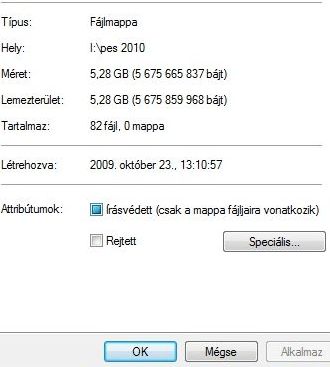
mikiking #18755 Sziasztok van egy ilyen problémám,hogy a mappák irásvédettségét ne mtudom megszuntetni,és ezáltal nem tudok velük mit kezdeni (most pont egy jatekban kéne a valtoztatás) nincs bepipálva,hanem egy ilyen kocka van ott.és akarhanyszor kiveszem. megnezem ujra,és megint viszaugrik.
![]()
-
#18754 Sziasztok! Feltettem a 7-t, telepítettem pér drvert, progit. Újraindíásnál felajánl két 7 közül választani. Valószínüleg valamelyik driver vagy program nem jó neki.
Valahogyan kilehet deríteni, hogy melyik nem jó? Esetleg a hibaüzenetet törölni? Köszi -
torok6 #18753 Sziasztok! A home prémium ugyan azokat a funkciókat támogatja mint a töbi (pl: ha leteszem tálcára az ablakot az kiadja pici ablakba?) -
#18752
hol kell beálitani a media player-ben az equalizert? -
 #18751
Witcherrel nekem úgy sikerült hogy a tuladjonságoknál állítgattam hogy XP módba fusson, sp2 sp1 sp3 rendszergazdai joggal vagy anélkül stb.... -
#18750
sziasztok
hogy legfelsö ablak alá banézni hogy mi van mögötte?
egyszer láttam egy videoban -
#18749
Nem tudom mien kölcsön kaptam egy ismerősömtől. És eredeti, még nem is aktiváltam :) -
#18748
Én sem kapcsoltam ki, csak kicsit 'finomhangoltam':
UAC is meg nem is :) -
 #18747
Én nem kapcsolom ki az UAC-ot, csak egy fokkal lejebb van véve az érzékenyésgi szinteje. -
#18746
Nem jó a driver támogatása az alaplapodnak, sajnos ez nem meglepő, cégek maguk döntik el, hogy támogatják e driver-ral az új oprendszet vagy nem. De sokszor az is előszokot forduli, hogy megy a hangkártya csak éppen nem úgy mint ahogy az ember elvárná. -
 #18745
Sziasztok !
Akinek talán nem tetszene a windows 7 külseje itt van egy rakat visual stlye hozzá :)
Katt -
BIZ0906 #18744 Hát ez elég problémásan néz ki :S THX a választ akkor vírus ellenőrzés és spyware írtás ha nem jön be akkor reinstall. -
 #18743
Buffer overrun detected :
"Well i have been doing some research, and i now know what is meant by the error displaying Buffer Overrun Error.
Basically, the problem is that there are A NUMBER OF VIRUSES on your computer, they are mostly spyware, and are part of a virus group called VUNDO. i dont know what VUNDO means but you know what i mean. I will keep you all updated on this. and what will be used best against these viruses.
these viruses are not potentially harmul, they are basic spyware which are over rulling your command to your camputer.
Obvious signs of this are:
- A massive number of pop-ups stating that you should download a free spyware check. DO NOT EVEN THINK ABOUT OPENING ONE OF THESE, AS THESE ARE THE VIRUSES IT SELF TRYING TO INPUT MORE INTO YOUR COMPUTER.
-Errors stating that you have a virus.
-Do Not Bother Using AVG or AVAST anti-virus to find viruses mentioned. these viruses are 2008 viruses and will not be detected by a standard update of your old anti virus." -
#18742
Nekem AMD/ATI van es ezt csinalta Dead Space-el .... minden mas game problema nelkul fut a gepen . Lehet egy ujratelepites segit ( en nem probaltam mert tort volt es annak tulajdonitottam a problemat )
Sok forumon az nv-nek akkor jon elo ez a problema miutan update-lik a VGA drivert .